
Download Thesaurus for Google Docs – Synonyms, Antonyms, Multi Language
Overview
The Thesaurus for Google Docs add-on is designed to enhance writing efficiency within Google Docs by providing instant access to synonyms, antonyms, and multilingual word alternatives. It serves as a powerful writing assistant for students, writers, editors, and professionals who rely on precise language in their documents. By integrating directly into the Google Docs environment, it streamlines the process of word refinement without requiring users to leave their workspace. The tool is particularly useful for improving clarity, avoiding repetition, and enriching vocabulary across various writing tasks.
Target users include content creators, academic researchers, language learners, and anyone seeking to elevate their written communication. The add-on operates as a browser-based utility, meaning it functions through the Chrome browser and requires an active internet connection for full functionality. Real-world use cases include editing essays, drafting professional emails, refining reports, and enhancing creative writing with diverse linguistic options. The developer, Thesaurus for Google Docs, has positioned the tool as a lightweight yet effective enhancement for digital writing workflows.
Key Features & Capabilities
- Instant Synonym and Antonym Lookup – Users can quickly find alternative words for any selected text directly within Google Docs, reducing the need to switch between applications.
- Multi-Language Support – The tool provides word equivalents in multiple languages, including French, German, Italian, Spanish, Portuguese, Russian, Norwegian, Slovak, and Greek, aiding multilingual users and language learners.
- One-Click Replacement – A dedicated feature allows users to replace the selected word with a suggested synonym or antonym with a single click, improving workflow speed and efficiency.
- Contextual Word Enhancement – The add-on offers nuanced alternatives that reflect tone, formality, and context, helping users refine their writing for greater impact and precision.
- Pro Version Enhancements – The Pro version includes additional features such as expanded language coverage and advanced word suggestions, though specific details are not publicly disclosed.
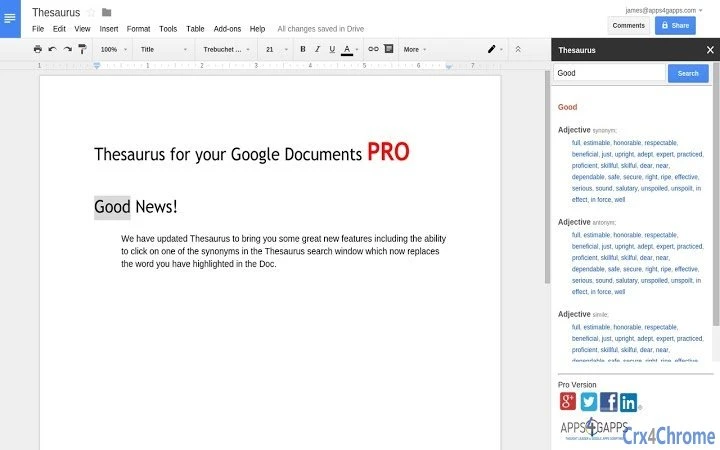
For example, when writing a report, a user might select the word “good” and instantly view alternatives like “peachy,” “bénévolo,” or “magnífico,” then replace it with the most suitable option in one click. This functionality is ideal for avoiding repetitive phrasing and maintaining reader engagement. The tool also supports educational use by exposing learners to vocabulary across languages, promoting language acquisition and cross-cultural understanding.
User Interface, Workflow & Performance
The user interface of Thesaurus for Google Docs is minimal and context-sensitive, appearing as a sidebar or pop-up panel within the Google Docs editor. Navigation is intuitive, with a clean layout that prioritizes accessibility and speed. Users can select a word, click the add-on icon, and view a list of alternatives without interrupting their writing flow. The workflow is optimized for efficiency, with quick access to both synonyms and antonyms and a direct replacement function.
Performance is generally smooth during typical usage, as the tool operates in the browser environment and leverages Google’s cloud infrastructure. The add-on does not require high CPU or RAM usage, making it suitable for use on a wide range of devices. However, the developer did not specify resource usage details. Stability is maintained through regular updates and integration with the Chrome browser ecosystem. Users may experience minor delays during initial load times if internet connectivity is slow, but these are typical for cloud-based tools.
Compatibility & System Requirements
Thesaurus for Google Docs is compatible with Windows, Mac, Linux, and Chrome OS, ensuring broad accessibility across desktop platforms. It functions as a Google Docs add-on, meaning it requires the Chrome browser for full operation. The installation size is 1.2 MB, indicating a lightweight footprint. The software version is 2.0.2, released on May 15, 2024.
Exact system requirements were not listed. Compatibility information is limited to the supported operating systems and browser dependency. The tool is designed to work with the latest versions of Chrome, and users are encouraged to keep their browser updated for optimal performance. No additional hardware specifications are provided, suggesting it is not resource-intensive.
Pros and Cons
Pros
- Seamless integration with Google Docs for uninterrupted writing
- Fast access to synonyms and antonyms with one-click replacement
- Supports multiple languages, enhancing global usability
- Lightweight design with minimal system impact
- Regular updates and ongoing development by the team
Cons
- Requires Chrome browser and internet connection for full functionality
- Pro version features are not fully disclosed
- Limited language support for some languages (e.g., Russian and Greek)
- Dependent on third-party infrastructure (Google and Chrome)
- No offline mode available
FAQ Section
Is Thesaurus for Google Docs compatible with all operating systems?
Yes, it is compatible with Windows, Mac, Linux, and Chrome OS, provided the Chrome browser is installed.
Can I use this tool offline?
No, the tool requires an internet connection as it relies on cloud-based services for word data and functionality.
Is the software free to use?
Yes, the basic version is free. A Pro version with additional features is available, though pricing details were not provided.
How do I update the add-on?
Updates are automatically managed through the Chrome Web Store. Ensure your Chrome browser is up to date for the latest version.
Is my feedback shared with the developers?
Feedback is submitted anonymously. To receive follow-up, users should include their email in the feedback form.
Final Thoughts + CTA
Thesaurus for Google Docs stands out as a practical, lightweight solution for enhancing written content within Google Docs. Its integration with the platform, multi-language support, and one-click replacement feature make it a valuable tool for writers, students, and professionals. While it relies on an internet connection and the Chrome browser, its performance and usability remain strong for daily writing tasks. The developer continues to improve the tool with regular updates and new features, particularly in the Pro version.
For anyone looking to enrich their vocabulary, avoid repetition, or work across languages, this add-on delivers real value. It’s especially beneficial for educators, content creators, and multilingual users. The free access to core features makes it highly accessible. Download Thesaurus for Google Docs now and elevate your writing experience with instant word enhancements.







